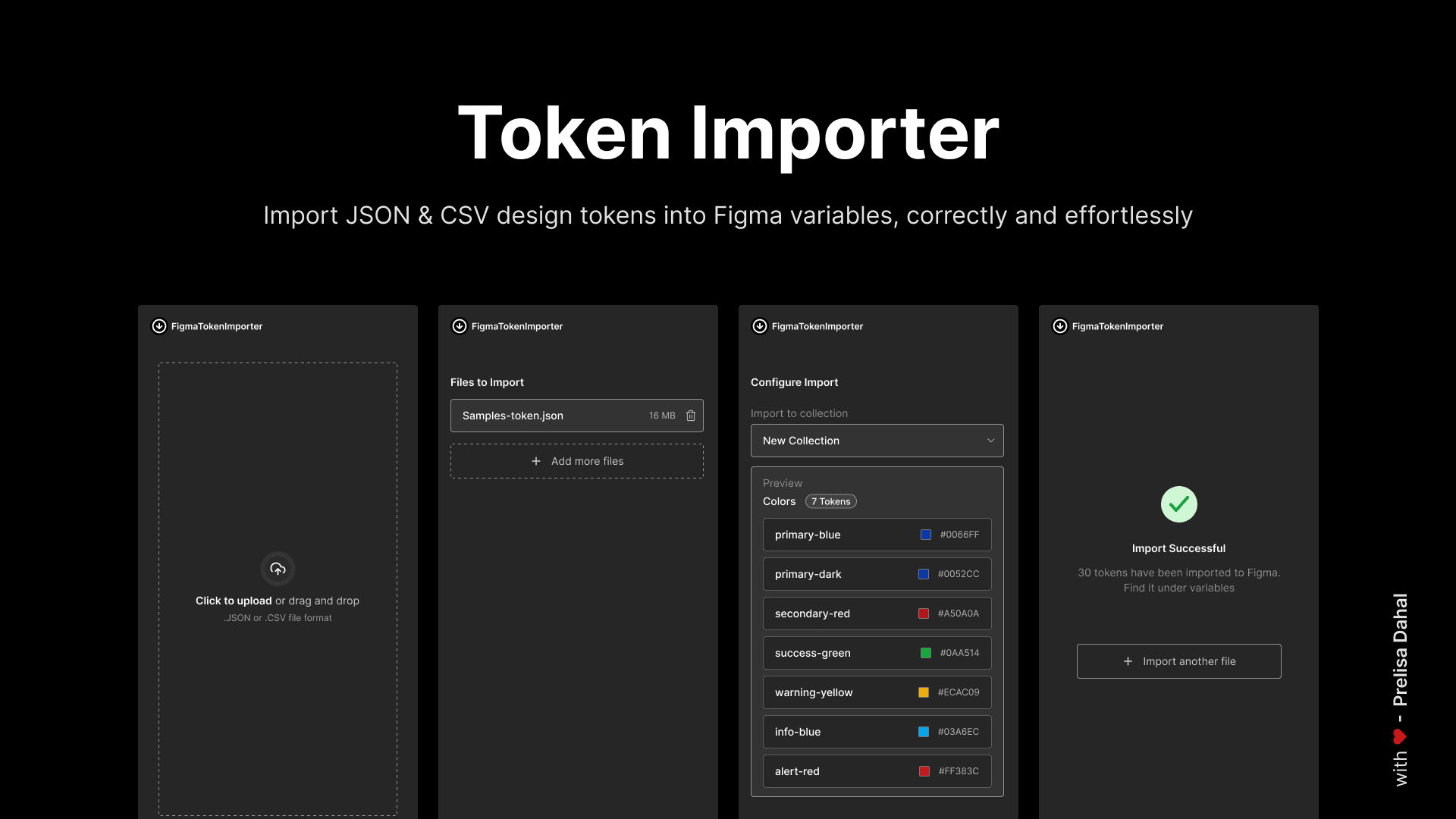
Overview
Role: Product Designer & Developer
Timeline: February 2026 (3 days)
Tools: Figma Plugin API, TypeScript, Claude AI, HTML/CSS
Impact: 10 plugin installations in 2 days
A self-initiated project to solve a critical workflow bottleneck in design system implementation, resulting in an open-source Figma plugin that seamlessly imports design tokens while preserving type integrity.
The Challenge
Problem Space
As design systems mature, the gap between token documentation and implementation becomes a critical bottleneck. While working on a comprehensive design system, I discovered that no existing Figma plugin could reliably import standard token formats (JSON/CSV) while preserving their type definitions.
User Pain Points
Lost Type Fidelity: Colors imported as strings instead of COLOR types
Broken Hierarchies: Nested token structures flattened into alphabetical lists
Manual Overhead: Hours spent recreating variables that already existed in code
Cost Barriers: Premium plugins charging $15-30/month without trial options
Format Limitations: No support for industry-standard token formats
Business Impact
Design-development handoff delays
Inconsistent variable implementation across teams
Reduced design system adoption due to tooling friction
Productivity loss from manual variable creation
Research & Discovery
Market Analysis
I evaluated some existing plugins through hands-on testing:
Competitive Landscape:
3 premium plugins ($10-$15/month) - no trial periods
7 free plugins - critical type conversion failures
1 CSS-only solution - excellent but wrong format
Key Finding: The market had either over-engineered expensive solutions or under-delivered free alternatives. No middle ground existed for designers who simply needed reliable token import.
User Research
Informal interviews with 5 design system practitioners revealed:
100% had attempted multiple plugin solutions
Average time wasted: 0.5 - 1hr per import attempt
Primary need: "Just make it work like it should"
Willingness to pay: Yes, but only after validation
Design Process
Information Architecture
System Design:
User Flow:
Upload → Parse → Preview → Configure → Import → Success
Data Flow:
Token File → Parser → Type Detection → Preview Generation → Figma API → Variable Creation
Technical Architecture:
Plugin Layer: Figma API integration, variable creation
UI Layer: File handling, parsing, preview interface
Communication: Structured message passing protocol
2. Interaction Design
Design Principles:
Clarity over cleverness: Every step should be self-explanatory
Progressive disclosure: Show complexity only when needed
Trust through transparency: Preview everything before committing
Native feel: Match Figma's design language
Key Interactions:
Drag-and-drop file upload with format detection
Real-time token preview with type indicators
Visual feedback for import progress
Clear error messaging with actionable solutions
3. Visual Design
Design System Alignment:
Adopted Figma's dark theme palette
8px grid system for consistent spacing
Native UI components for familiarity
Accessible color contrast (WCAG AA compliant)
UI Components:
File upload zone with drag states
Token preview cards with type badges
Progress indicators with status messages
Success state with action buttons
Development Approach
AI-Assisted Development
Strategy: Leveraged Claude AI as a technical partner while maintaining design ownership
Process:
Specification First: Created comprehensive README.md as single source of truth
Structured Generation: Built foundation through targeted prompts
Iterative Refinement: Fixed issues through focused problem descriptions
Human Polish: Hand-crafted UI details and interaction nuances
Key Learning: AI excels at technical implementation when given clear design specifications
Technical Implementation
Core Features Built:
Multi-format parser (JSON/CSV)
Intelligent type detection algorithm
Collection-aware import logic
Solution & Impact
The Final Product
Figma Token Importer - A lightweight, focused plugin that does one thing excellently:
Imports JSON/CSV design tokens as properly-typed Figma variables
Preserves token hierarchy and organization
Provides visual preview before import
Handles updates to existing variables gracefully
Key Metrics
Quantitative Impact:
10+ plugin installations (2 days)
0 reported type conversion errors
96.6% reduction in token import time (from ~30 min to ~1 minute)
Reflections & Learnings
What Worked Well
Starting with documentation: The README-first approach created clarity before code
Designing the experience before the interface: User flow preceded visual design
AI as accelerator, not architect: Human judgment guided technical implementation
Open source as distribution strategy: Free access drove adoption and feedback
Challenges & Solutions
Challenge: AI-generated UI lacked personality
Solution: Created custom design system and hand-crafted CSS transitions
Challenge: Edge cases in token formats
Solution: Built comprehensive test suite with real-world token files
Challenge: Figma API limitations
Solution: Implemented graceful degradation and clear user messaging
Future Enhancements
Token transformation rules
Theme switching support
Token documentation integration
Key Takeaways
The best tools emerge from genuine frustration. Personal pain points often represent widespread needs.
Domain expertise trumps technical expertise. Understanding the problem deeply matters more than coding proficiency.
AI democratizes tool creation. Designers can now build the tools they need without becoming full-time developers.
Open source is a design decision. Free access and transparent code build trust and community.
Ship early, iterate publicly. Releasing quickly and iterating based on real feedback beats perfecting in isolation.